Loading...
Buyers often ask: “Is a paperless conference system just tablets on desks?” The real answer is no. A true paperless system is an integrated architecture that connects per-seat terminals, meeting management software, and audiovisual control into one coordinated workflow. Done right, it reduces organizer workload, speeds up decisions, and eliminates printing and projector dependencies.
1) Participant layer (conference terminals)
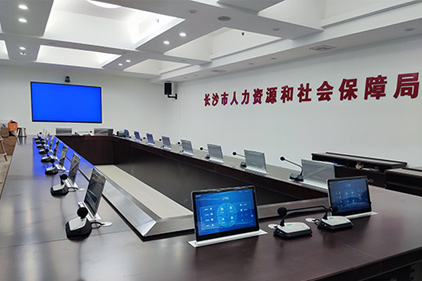
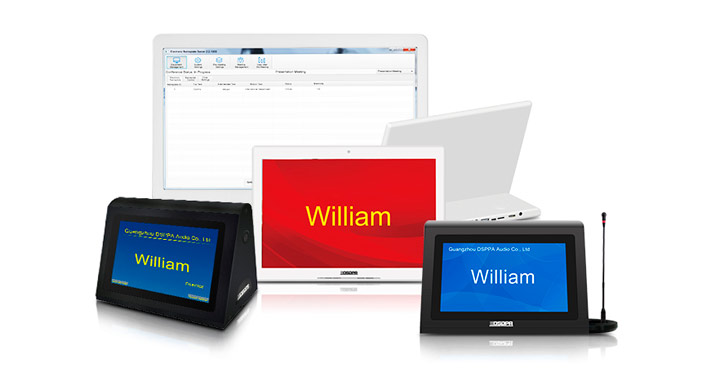
Each seat uses a paperless conference terminal (desktop or motorized lifting monitor). Participants view meeting documents, sign in, vote, and follow synchronized screens.
2) Control layer (management terminal/software)
Admins create meetings, upload materials, set permissions, manage check-in, launch votes, and export records. DSPPA highlights standardized management and resource pooling—critical for multi-room deployments.
3) Integration layer (AV control + network)
This layer connects the conference system to display, audio, and (optionally) recording/broadcasting. DSPPA emphasizes integration of communication audiovisual control and software.
Step 1: Meeting creation & content upload
Organizers prepare agenda and files, then upload to the back-end.
Step 2: Real-time distribution to terminals
Participants receive materials on their terminals. If content changes, updates can be pushed without reprinting.
Step 3: Check-in & attendance count
Attendees sign in; the management terminal monitors real-time participation.
Step 4: Synchronized viewing / presentation control
The host can enable synchronized viewing so all attendees stay on the same interface.
Step 5: Voting & decision capture
The system supports voting and records outcomes for post-meeting reporting.
Step 6: Data saving & meeting archive
Meeting information can be saved on the host for later review.
The hidden cost of meetings is organizer workload: printing, seating documents, collecting ballots, and reconciling results. DSPPA positions paperless meetings as reducing work pressure for organizers and lowering costs linked to printing and projection equipment.
From the product page, DSPPA paperless conference system emphasizes:
diversified functions
resource pooling
management standardization
intuitive interface
simple and steady operation
These points map directly to what buyers evaluate: usability, deployment at scale, and operational reliability.
Q: What equipment is included in a paperless conference system?
Typically: conference terminals, file/control host, and back-end management software; often integrated with audio and AV control.
Q: Can a paperless conference system reduce printing and projector costs?
Yes—paperless workflows reduce printing needs and can lower reliance on projection equipment.